
Zoho — The Best Accounting Software for Small Businesses
Zoho Books is a complete cloud-based accounting platform designed for startups, freelancers, microbusinesses, and growing small businesses. It provides everything needed to manage finances — from invoicing, inventory, bank reconciliation, tax compliance, automations, to integrations with the Zoho ecosystem. Zoho stands out for offering enterprise-level features at small-business pricing.
Pros
- User-friendly and modern interface
- Extensive automation capabilities
- Strong mobile app functionality
- Great invoicing & recurring billing tools
- Deep integration with Zoho ecosystem
- Good pricing compared to competitors
Cons
- Payroll availability varies by region
- Advanced features may require higher-tier plans
- Full ecosystem setup can take time to master
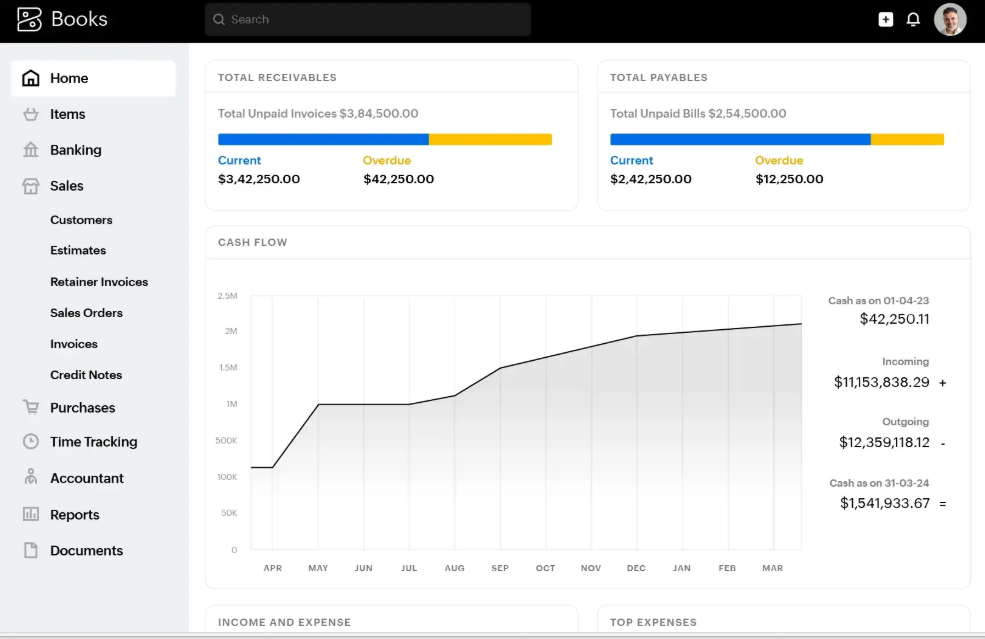
Zoho Features
- Advanced Invoicing: Create professional invoices, automate reminders, accept online payments.
- Expense & Vendor Tracking: Upload receipts, categorize expenses, and manage supplier payments.
- Bank Feeds & Reconciliation: Connect your bank, automate imports, and simplify reconciliation.
- Inventory Management: Track stock levels, create items, and manage product sales.
- Project Accounting: Track billable hours, project expenses, and issue project invoices.
- Automation: Workflows, triggers, reminders, recurring invoices, and rule-based tasks.
- Tax Compliance: Automated VAT/GST calculations and tax reporting.
- Reporting & Analytics: Financial statements, dashboards, and performance insights.
- Integrations: Works with Zoho CRM, Zoho Inventory, Zoho Payroll, and third-party tools.
How Zoho Pricing Works
Zoho Books offers flexible pricing structured according to features and number of users. Plans typically include:
- Free Plan: Suitable for very small businesses with limited revenue.
- Standard Plan: Affordable pricing with essential accounting features.
- Professional & Premium Plans: Offer advanced inventory, reporting, and automation tools.
- Add-On Users: Additional users can be added for a small monthly fee.
- Country-Based Pricing: Costs vary by region and local tax requirements.
Zoho’s pricing model makes it one of the most cost-effective accounting solutions globally.
Markets Served by Zoho Books
Zoho Books is used globally and is ideal for:
- Freelancers & independent professionals
- Startups and microbusinesses
- Service-based companies
- Retail and e-commerce businesses
- Agencies and consultants
- SMEs managing multiple projects or clients
Its versatility and pricing make it suitable for both emerging entrepreneurs and established SMEs.
Read our full Zoho review.
Sage Accounting — Efficient Accounting for Small and Medium Businesses
Sage Accounting is a cloud-based accounting solution tailored for small to medium-sized businesses. It helps manage invoicing, cash flow, expenses, tax compliance, reporting, and integrates with other business apps. Sage stands out for its reliability, automation, and scalability for growing businesses.
Pros
- Easy-to-use dashboard and interface
- Automated invoicing and payment reminders
- Strong financial reporting and analytics
- Cloud-based access from anywhere
- Supports multi-currency and multiple companies
- Good integration with other apps like Microsoft 365
Cons
- Advanced features require higher-tier plans
- Some features may vary by country
- Limited customization for invoices in basic plans
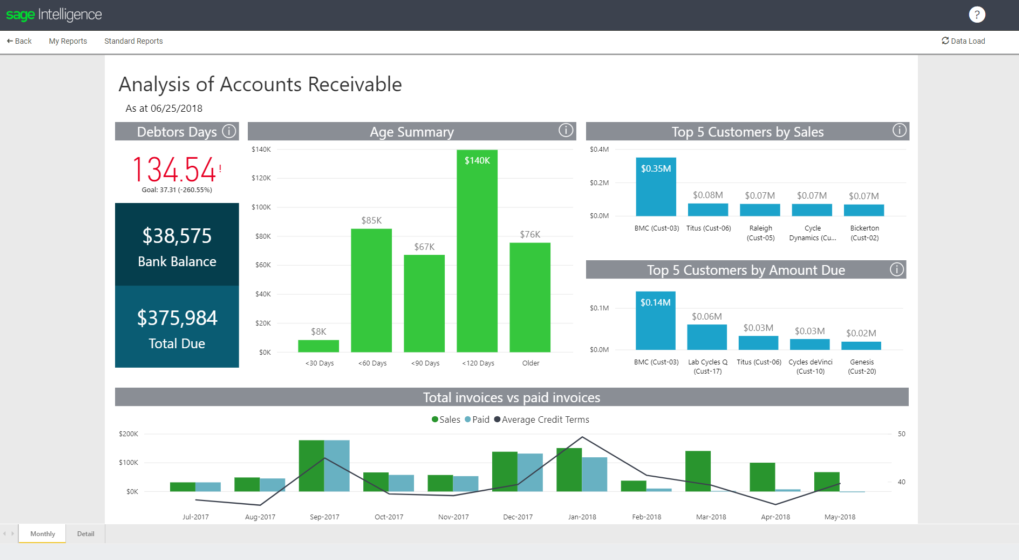
Sage Accounting Features
- Invoicing & Payments: Create professional invoices, send reminders, accept online payments.
- Expense Management: Track business expenses, upload receipts, categorize transactions.
- Bank Feeds & Reconciliation: Connect bank accounts, automate imports, reconcile accounts easily.
- Cash Flow Tracking: Monitor cash inflows/outflows, forecast finances, manage budgets.
- Reporting & Analytics: Financial statements, dashboards, KPIs, and business insights.
- Multi-Currency & Multi-Company: Manage multiple entities or currencies in one system.
- Integrations: Works with Microsoft 365, payroll apps, payment gateways, and other business tools.
- Automation: Recurring invoices, reminders, and rule-based workflows to save time.
- Tax Compliance: Supports VAT/GST calculations, tax reports, and filing requirements.
How Sage Pricing Works
Sage Accounting offers tiered plans based on features and business size. Plans typically include:
- Start Plan: Basic invoicing, expense tracking, suitable for microbusinesses.
- Accounting Plan: Essential accounting features including reporting and cash flow management.
- Accounting Plus: Advanced features including multi-user access, inventory, and analytics.
- Additional Users: Add extra users for a monthly fee, depending on plan.
- Country-Based Pricing: Prices may vary depending on your location and local tax regulations.
Sage’s pricing provides flexibility for growing small and medium businesses worldwide.
Markets Served by Sage Accounting
Sage Accounting serves small and medium-sized businesses globally, including:
- Freelancers and consultants
- Startups and growing companies
- Retail, e-commerce, and service businesses
- Professional services and agencies
- SMEs managing multiple projects or locations
Its scalability and features make it suitable for both new entrepreneurs and established businesses.
Read our full Sage Accounting review.
Sage Payroll — Simplifying Payroll for Small and Medium Businesses
Sage Payroll is a cloud-based payroll management solution designed to help small and medium-sized businesses process salaries, manage employee benefits, and comply with tax regulations efficiently. It automates calculations, ensures accurate tax submissions, and provides easy reporting for business owners and HR teams.
Pros
- Automates payroll calculations and tax submissions
- Easy employee management and record keeping
- Compliant with local tax and labor laws
- Supports multiple pay schedules and payment methods
- Integration with Sage Accounting and HR tools
- Cloud access from anywhere, anytime
Cons
- Advanced features may require higher-tier plans
- Limited customization options for pay slips in basic plans
- Some integrations may require additional setup
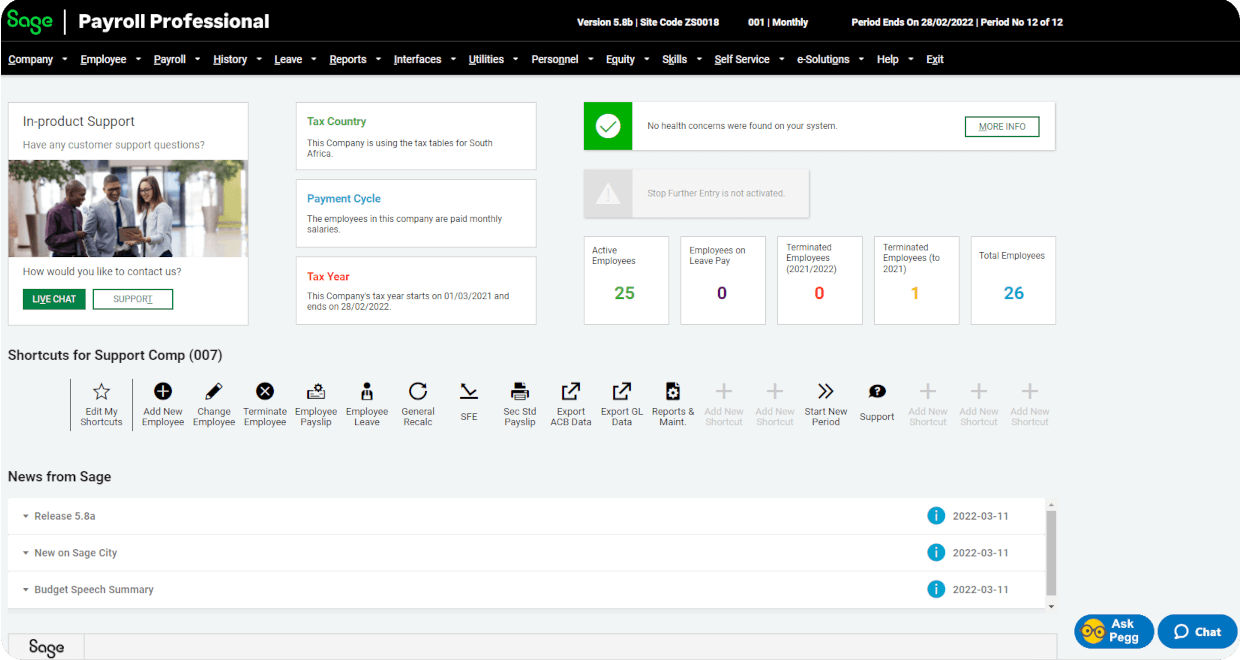
Sage Payroll Features
- Automated Payroll: Calculates salaries, deductions, bonuses, and overtime automatically.
- Tax Compliance: Handles tax calculations, filings, and regulatory compliance for different regions.
- Employee Management: Maintain employee records, benefits, leave balances, and pay history.
- Payment Options: Supports bank transfers, cheques, and other payment methods.
- Reporting & Analytics: Generates payroll reports, payslips, tax summaries, and year-end reports.
- Integration: Works seamlessly with Sage Accounting, HR, and other business systems.
- Multi-Country & Multi-Currency: Supports businesses with international employees or operations.
- Self-Service Portal: Employees can view payslips, leave balances, and tax documents online.
How Sage Payroll Pricing Works
Sage Payroll pricing is flexible depending on the number of employees and features needed:
- Starter Plan: Basic payroll for small teams with automated calculations and payslips.
- Standard Plan: Includes compliance, tax filing, and reporting features for growing businesses.
- Advanced Plan: Supports multi-user access, integrations, and advanced reporting for larger organizations.
- Additional Employees: Add extra employees for a monthly fee based on plan.
- Country-Based Pricing: Costs may vary depending on location and local tax regulations.
Sage Payroll pricing scales with your business needs, making it suitable for both startups and SMEs.
Markets Served by Sage Payroll
Sage Payroll serves small and medium-sized businesses globally, including:
- Startups and growing companies
- Retail, service, and e-commerce businesses
- Professional services and consultancies
- Companies with multiple payroll schedules or locations
- SMEs requiring compliance with local tax and labor laws
Its automation, reporting, and compliance features make it ideal for businesses looking to simplify payroll management.
Read our full Sage Payroll review.
Xero — Cloud Accounting for Small Businesses
Xero is a cloud-based accounting platform designed for small and medium-sized businesses. It offers invoicing, bank reconciliation, payroll integration, reporting, and real-time collaboration with accountants. Xero is known for its simplicity, automation, and extensive ecosystem of third-party apps.
Pros
- User-friendly interface and dashboard
- Automated bank feeds and reconciliation
- Strong integration with third-party apps
- Robust reporting and analytics
- Cloud-based access anytime, anywhere
- Payroll functionality in supported regions
Cons
- Payroll and advanced features vary by country
- Some automation features require higher-tier plans
- Limited customization for invoices in basic plans
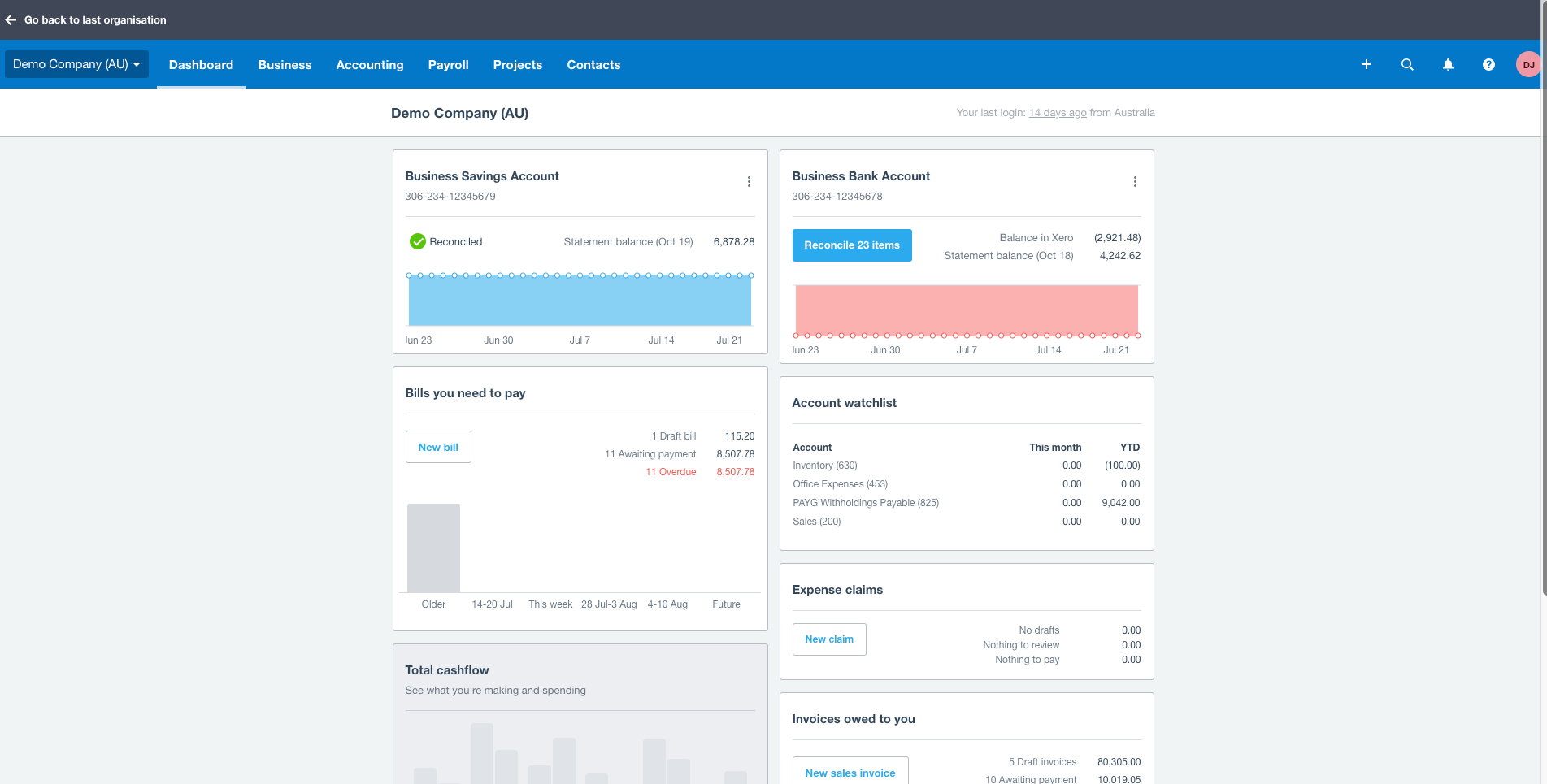
Xero Features
- Invoicing & Quotes: Create and send professional invoices, manage quotes, and automate reminders.
- Bank Reconciliation: Connect bank accounts and credit cards for automated reconciliation.
- Expense Tracking: Upload receipts, categorize expenses, and manage bills.
- Payroll Integration: Manage payroll (where supported), track leave, and calculate taxes.
- Financial Reporting: Real-time reports, dashboards, and KPI tracking.
- Multi-Currency: Supports businesses dealing with multiple currencies.
- Collaboration: Share data with your accountant or team in real time.
- Integrations: Connects with hundreds of third-party apps for CRM, payments, inventory, and more.
- Automation: Recurring invoices, bank rules, and payment reminders save time.
How Xero Pricing Works
Xero offers subscription-based plans depending on business needs and features:
- Early Plan: Suitable for small businesses, includes invoicing, bills, and bank reconciliation.
- Growing Plan: Adds full access to all core accounting features for expanding businesses.
- Established Plan: Advanced reporting, multiple currencies, and premium features for larger SMEs.
- Add-On Users: Invite your accountant or additional team members at no extra cost.
- Region-Based Pricing: Costs may vary depending on country and tax regulations.
Xero’s subscription model provides flexibility for small and growing businesses globally.
Markets Served by Xero
Xero is used by small and medium-sized businesses worldwide, including:
- Startups and growing companies
- Freelancers and consultants
- Retail, e-commerce, and service-based businesses
- Professional services and agencies
- SMEs managing multiple projects or clients
Its cloud-based platform, automation, and integrations make it suitable for businesses seeking efficiency and real-time accounting.
Read our full Xero review.
QuickBooks — Accounting Made Simple for Small Businesses
QuickBooks is a cloud-based accounting platform for small and medium-sized businesses. It helps manage invoicing, expenses, payroll, taxes, and reporting efficiently. QuickBooks is known for its ease of use, automation, and large ecosystem of integrations.
Pros
- Easy-to-use interface with dashboards
- Automated invoicing, payments, and bank feeds
- Robust reporting and financial insights
- Payroll integration available in supported regions
- Supports multi-currency transactions
- Integrates with numerous third-party apps
Cons
- Some features are limited to higher-tier plans
- Pricing can be higher than competitors for advanced features
- Learning curve for full ecosystem and integrations
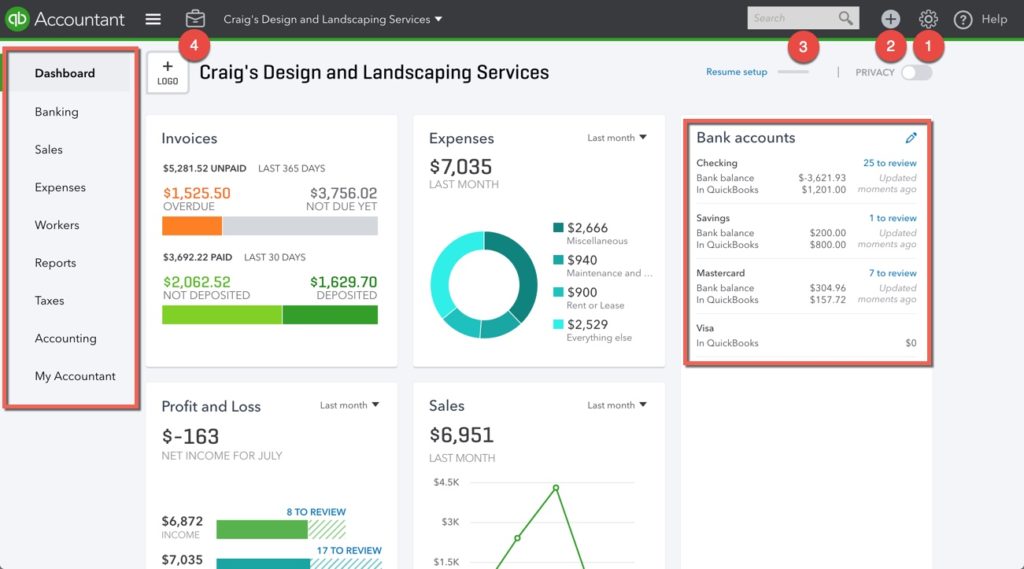
QuickBooks Features
- Invoicing & Payments: Create and send invoices, accept online payments, and automate reminders.
- Expense Tracking: Capture receipts, categorize expenses, and manage bills.
- Bank Reconciliation: Connect bank accounts, automate transactions, and reconcile accounts easily.
- Payroll Management: Automate payroll, calculate taxes, and manage employee payments.
- Financial Reporting: Generate profit & loss statements, balance sheets, and cash flow reports.
- Tax Management: Track sales tax, prepare tax forms, and file electronically.
- Multi-Currency: Handle multiple currencies for global transactions.
- Automation: Recurring invoices, payment reminders, and rules-based bank feeds.
- Integrations: Connects with apps for CRM, inventory, e-commerce, and payments.
How QuickBooks Pricing Works
QuickBooks pricing is subscription-based with multiple plans:
- Simple Start: Basic accounting for freelancers and small businesses.
- Essentials: Adds bill management, multi-user access, and time tracking.
- Plus: Full accounting, project tracking, inventory, and advanced reporting.
- Advanced: Designed for growing businesses needing automation, analytics, and multiple users.
- Add-On Users: Additional users may be added depending on the plan.
QuickBooks offers flexibility to scale with your business and accounting needs.
Markets Served by QuickBooks
QuickBooks serves a variety of small and medium-sized businesses globally:
- Startups and small businesses
- Freelancers and consultants
- Retail, e-commerce, and service companies
- Professional services and agencies
- SMEs requiring payroll, tax compliance, and reporting automation
Its scalability, automation, and integrations make it ideal for businesses seeking efficiency and control over finances.
Read our full QuickBooks review.

FNB Instant Accounting — Simple, Free Accounting for FNB Business Clients
FNB Instant Accounting is an online bookkeeping and accounting solution available to FNB business‑banking clients. It uses your electronic FNB bank statements to automatically generate financial statements, cash‑flow reports, and VAT returns — helping you manage your business finances without needing standalone accounting software. :contentReference[oaicite:1]{index=1}
Pros
- Free to all qualifying FNB Business clients — no license, upgrade or support fees :contentReference[oaicite:2]{index=2}
- Automatic import of bank statements — minimal manual data capture needed :contentReference[oaicite:3]{index=3}
- Generates income statements, balance sheets, cash‑flow reports, VAT and more :contentReference[oaicite:4]{index=4}
- Secure storage with backups on FNB servers, no need for software install or maintenance :contentReference[oaicite:5]{index=5}
- Accessible online — view your financials anywhere with internet access :contentReference[oaicite:6]{index=6}
Cons
- Only available to businesses banking with FNB and registered for online business banking :contentReference[oaicite:7]{index=7}
- Functionality depends on quality of bank statement data — manual adjustments may be needed for non‑standard transactions :contentReference[oaicite:8]{index=8}
- Limited to what bank account data captures — may not suit very complex accounting needs or inventory‑heavy businesses
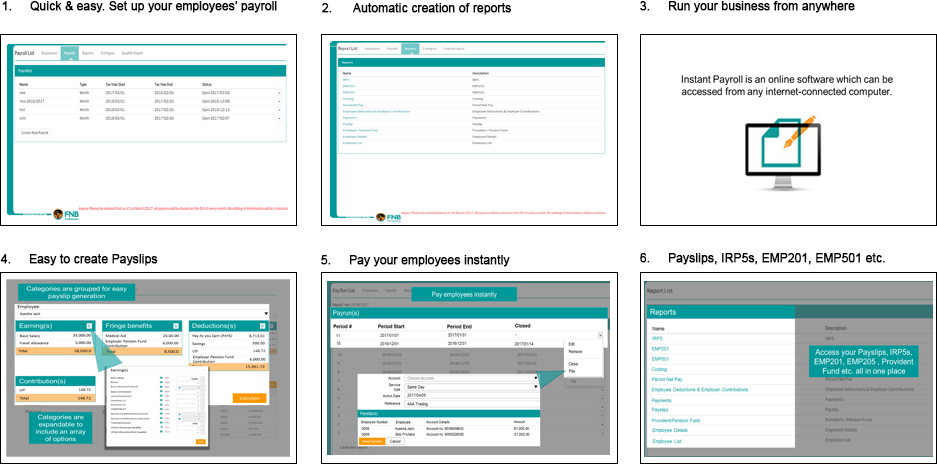
FNB Instant Accounting Features
- Automatic Bank Statement Import: Bank transactions are imported automatically — no need for manual CSV uploads. :contentReference[oaicite:9]{index=9}
- Financial Statements: Generate income statements, balance sheets, cash‑flow reports, VAT reports. :contentReference[oaicite:10]{index=10}
- Debtors & Creditors / VAT / Budgeting: Supports basic bookkeeping functions including VAT tracking, debtor/creditor management, budgeting. :contentReference[oaicite:11]{index=11}
- Secure Online Access & Data Storage: Data stored on FNB servers with backups; access via any device with internet. :contentReference[oaicite:12]{index=12}
- User‑Friendly Dashboard & Reports: Updated daily, easy-to-read charts and financial overviews. :contentReference[oaicite:13]{index=13}
How FNB Instant Accounting Pricing Works
FNB Instant Accounting is offered free of charge to qualifying FNB business‑banking clients. :contentReference[oaicite:14]{index=14} There are no license, upgrade or support fees — making it a cost‑effective option for small and medium‑sized businesses. :contentReference[oaicite:15]{index=15}
Who Can Use FNB Instant Accounting
FNB Instant Accounting is ideal for:
- Small and medium-sized businesses banking with FNB
- Freelancers and solo entrepreneurs needing simple bookkeeping
- Businesses with mainly bank-based transactions (sales, expenses, payments)
- Business owners who want automated, up-to-date bookkeeping with minimal effort
- Accountants/bookkeepers servicing small business clients — system supports accountant access. :contentReference[oaicite:16]{index=16}
If your business fits those, Instant Accounting can save you time and money while giving you access to professional financial reports.
Want full details? Visit the official FNB Instant Accounting page.

FreshBooks — The Best Accounting Software for Service-Based Businesses
FreshBooks is an easy-to-use cloud accounting platform built especially for freelancers, consultants, agencies, and service-based small businesses. It excels in invoicing, client management, time tracking, online payments, and simple bookkeeping. FreshBooks stands out for its simplicity, clean interface, and excellent customer support.
Pros
- Extremely user-friendly interface
- Powerful invoicing tools
- Built-in time tracking for projects
- Easy online payment options for clients
- Strong mobile app
- Great customer support
Cons
- Limited advanced accounting features
- Inventory tracking is basic
- Pricing increases with more clients/users
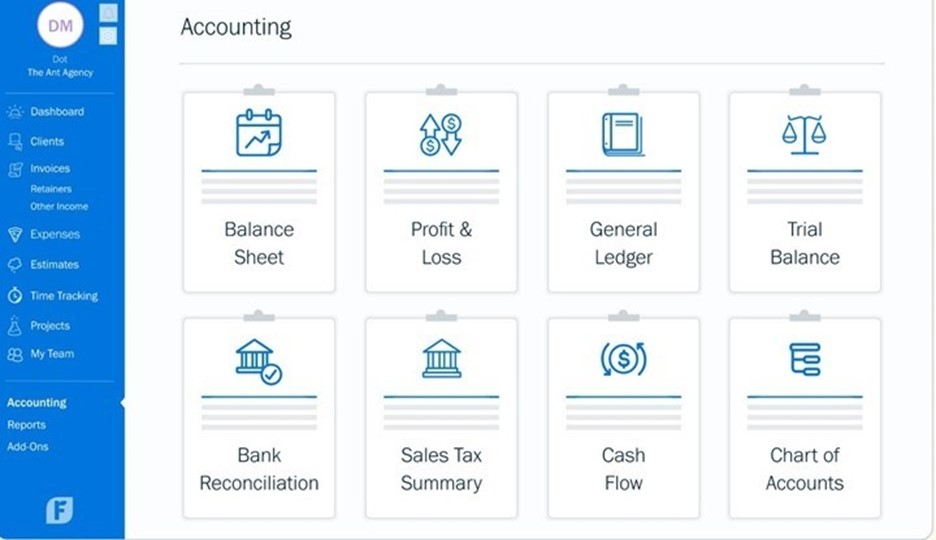
FreshBooks Features
- Advanced Invoicing: Custom invoices, automatic reminders, and online payments.
- Time Tracking: Log billable hours and convert them into invoices instantly.
- Expense Tracking: Snap receipts, categorize expenses, and track vendor payments.
- Project Management: Collaborate with clients and teams on projects.
- Client Management: Client portals, communication, and project visibility.
- Estimates & Proposals: Create and convert quotes into invoices.
- Basic Accounting: Balance sheet, profit & loss, and financial reports.
- Integrations: Stripe, PayPal, Gusto, Shopify, Zapier, and more.
How FreshBooks Pricing Works
FreshBooks pricing is based on business size, number of clients, and features required:
- Lite Plan: Ideal for very small businesses and freelancers.
- Plus Plan: Best for growing service businesses.
- Premium Plan: Designed for businesses with higher client volumes.
- Select Plan: Custom pricing for larger operations.
- Additional Users: Billed per user per month.
FreshBooks is known for simple pricing and strong value for service-based entrepreneurs.
Markets Served by FreshBooks
FreshBooks is ideal for:
- Freelancers
- Consultants and agencies
- Service-based businesses
- Self-employed professionals
- Creative professionals
- Small businesses needing simple accounting
FreshBooks is perfect for businesses that prioritize client billing, time tracking, and project management.
Read our full FreshBooks review.
NetSuite — The Best ERP Accounting Solution for Growing and Enterprise Businesses
NetSuite is a powerful cloud-based ERP platform offering full financial management, supply chain control, inventory automation, CRM, and advanced business analytics. It is designed for midsize to large organizations that need end-to-end visibility, automation, and scalability across all operations. NetSuite stands out as one of the most comprehensive cloud ERP systems globally.
Pros
- Extremely powerful and scalable ERP system
- Advanced financial management capabilities
- Real-time dashboards and analytics
- Strong multi-entity and multi-currency support
- Highly customizable workflows
- Integrated CRM, inventory, HR, and operations modules
Cons
- More expensive than small-business tools
- Requires professional onboarding
- Advanced configurations can take time to set up
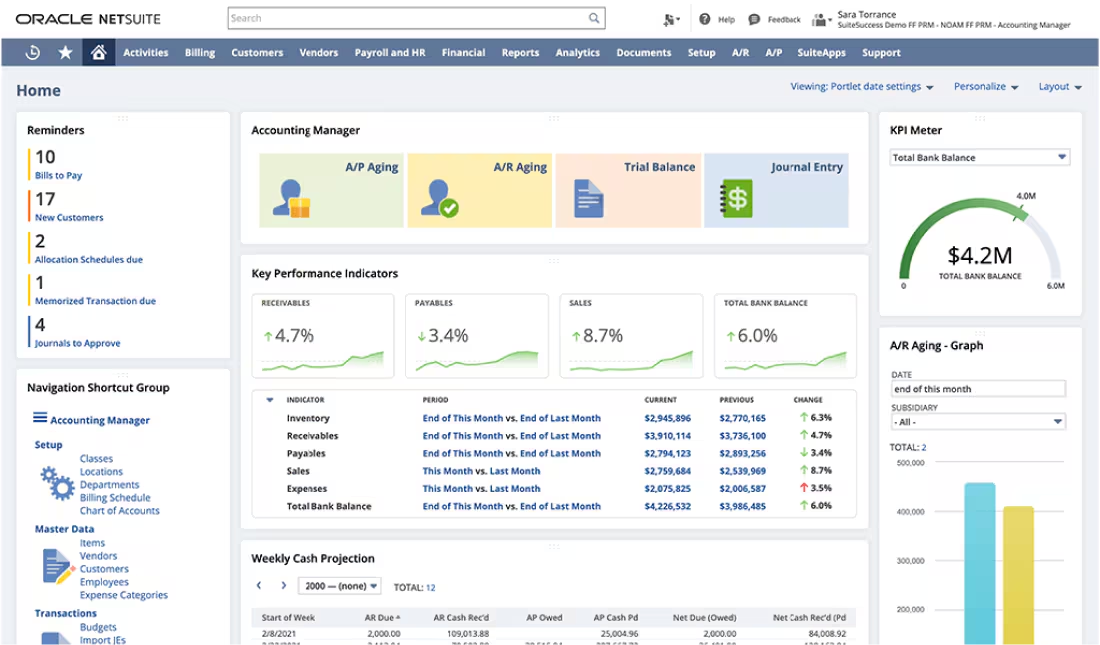
NetSuite Features
- Financial Management: General ledger, AR/AP, billing, and financial planning.
- Inventory & Supply Chain: Demand planning, procurement, fulfillment, automation.
- Multi-Entity Support: Manage subsidiaries, currencies, taxes, and consolidation.
- CRM & Sales: Lead tracking, sales automation, customer insights.
- Project Management: Resource planning, time tracking, and project reporting.
- HR & Payroll: Employee records, performance, and workforce management.
- Automation: Custom workflows, approvals, and saved searches.
- Advanced Reporting: Real-time dashboards, KPIs, and analytics.
- Integrations: API connectivity with payment, e-commerce, and logistics systems.
How NetSuite Pricing Works
NetSuite uses a custom quote-based pricing model, depending on the modules and number of users required:
- Base License Fee: Required for platform access.
- User Licenses: Additional cost per full user.
- Optional Modules: Inventory, CRM, HR, planning, supply chain, etc.
- Implementation Costs: Setup, data migration, and workflow customization.
- Annual Renewal: Subscription-based pricing model.
NetSuite is priced higher than small-business software but delivers enterprise-level functionality.
Markets Served by NetSuite
NetSuite is ideal for:
- Growing mid-size businesses
- Large enterprises
- Wholesale, distribution, and manufacturing
- Professional services firms
- E-commerce and retail
- Nonprofits and global organizations
- Companies with multi-entity operations
NetSuite is best suited for businesses needing full ERP capabilities, automation, and global scalability.
Read our full NetSuite review.

Wave — The Best Free Accounting Software for Small Businesses & Freelancers
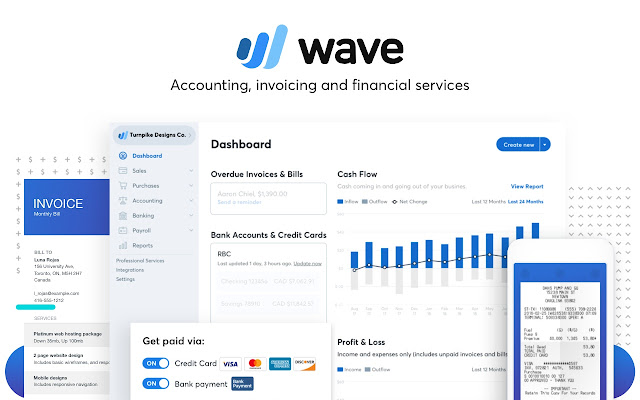
Wave Accounting is a free, easy-to-use cloud-based accounting platform built for freelancers, small businesses, and entrepreneurs. It offers powerful bookkeeping, invoicing, and financial reporting tools at no cost, making it one of the best-value accounting solutions available. Wave stands out as a beginner-friendly system with no monthly fees for its core features.
Pros
- Completely free accounting and invoicing
- Clean, simple, beginner-friendly interface
- Unlimited invoices and clients
- Unlimited expense tracking
- Strong financial reporting for a free tool
- Good mobile functionality
Cons
- Limited advanced accounting features
- No inventory management
- Paid features required for payroll and payments
Wave Accounting Features
- Free Invoicing: Send unlimited professional invoices and payment reminders.
- Income & Expense Tracking: Track transactions and categorize expenses.
- Bank Connections: Import transactions securely from your bank.
- Financial Reports: P&L, balance sheet, cash flow statements.
- Receipts Upload: Upload and scan receipts through mobile.
- Online Payments (Paid Add-On): Accept card or bank payments.
- Payroll (Paid Add-On): Run payroll in supported countries.
- Multi-Business Support: Manage multiple businesses in one account.
- Integrations: Google Sheets, Zapier, and third-party automation tools.
How Wave Pricing Works
Wave’s pricing model is highly competitive — the core accounting tools are totally free:
- Free Accounting: Full bookkeeping, reports, invoicing, and receipt uploads.
- Payments: Small fee per transaction for accepting online payments.
- Payroll: Monthly fee (varies by region).
- Advisory Services: Paid bookkeeping, coaching, and support services.
Wave is one of the most affordable accounting platforms for freelancers and micro-businesses.
Markets Served by Wave
Wave is ideal for:
- Freelancers
- Solo entrepreneurs
- Self-employed professionals
- Small service-based businesses
- Side hustlers and gig workers
- Businesses with simple accounting needs
Wave is perfect for businesses that want reliable accounting software without monthly fees.
Read our full Wave Accounting review.

Odoo — The Most Flexible Accounting System for Integrated Business Management
Odoo Accounting is part of the larger Odoo ERP ecosystem, offering a modular and customizable platform that integrates sales, inventory, HR, CRM, and more. It is built for businesses that want full control over their workflows, powerful automation, and an accounting system that works seamlessly with other operations. Odoo stands out for flexibility, open-source options, and strong scalability.
Pros
- Extremely flexible and modular system
- Powerful automation and workflow customization
- Strong invoicing and billing capabilities
- Integrated with CRM, inventory, POS, HR, and more
- Open-source option available
- Modern and intuitive interface
Cons
- Advanced customization may require technical skills
- Some features require paid modules
- Implementation can take longer for new users
Odoo Accounting Features
- Invoicing & Billing: Create invoices, automate reminders, and accept online payments.
- Bank Sync & Reconciliation: Automatically import and match bank transactions.
- Expense Management: Upload receipts, reimburse employees, and track vendor bills.
- Inventory Integration: Real-time stock updates linked directly to accounting.
- Sales Integration: Convert quotes to invoices automatically.
- Automation: Smart workflows, approvals, and rule-based accounting entries.
- Multi-Currency Support: Automatic exchange rate updates.
- Tax Management: VAT/GST setup, compliance reports, audit-ready documentation.
- Financial Reporting: P&L, balance sheet, cash flow, aged receivables/payables.
- Integrations: Connects with 40+ Odoo modules plus third-party apps.
How Odoo Pricing Works
Odoo offers one of the most flexible pricing structures on the market:
- Odoo Community (Free): Open-source version with essential features.
- Odoo Online (Paid): Subscription pricing per user + per app.
- Odoo Enterprise: Full suite with advanced features and support.
- Optional Apps: You only pay for the modules your business needs.
- Implementation Costs: Setup, configuration, and custom development if required.
Odoo is cost-effective for small businesses but can scale into a full ERP for larger enterprises.
Markets Served by Odoo
Odoo is ideal for:
- Small to medium-sized businesses
- Large enterprises needing custom workflows
- Manufacturing and distribution companies
- Retail and e-commerce
- Agencies, service providers, and consultants
- Firms needing a modular all-in-one ERP
- Businesses with developers wanting full customization
Odoo’s flexibility makes it suitable for almost every industry, from startups to global enterprises.
Read our full Odoo Accounting review.